Tool · Worksheets · Free

Dynamic Problem Maker.

"No two assignments should ever be the same."

Author one word problem, define your variables, and the maker builds a unique self-grading worksheet for every student. Print it, save it as standalone HTML, or share the link. Runs in the browser — no install, no account.

pblmath.com / apps / dpm
App type
Homework / assessment
Grade level
3–8
Best for
Word problems
Cost
Free
Why use it

What if the numbers changed every time?

Most worksheets — and even most online problem sites — are static or pulled from a fixed question bank. A dynamic problem regenerates its numbers every time a student opens it, so the same skill produces a different problem for every student, every attempt.

The catch: building that normally requires a teacher to write code. The fix: this tool does the coding for you — and the generated problem even grades itself.

What it changes in your classroom

Five things this fixes.

Instant feedback

No more "pass it out Monday, hand it back Wednesday." The generated problem tells a student immediately if the answer is right, wrong, or missing units — and links to the lesson.

They teach each other

"What'd you get for number 4?" stops working — the numbers are different for everyone. Students have to actually show each other how to solve it.

A real study tool

"I already did these / I know the answers" disappears. Click RESET and a fresh problem with new numbers is generated for endless practice.

Find who's actually struggling

Since students can't copy 5 minutes before class, the ones who don't understand surface early — before an assessment, not after.

Resources, linked in

Access to private tutoring is a privilege gap. Linking the lesson or a help video right on the homework gives every student instant help.

Self-grading, every time

The problem checks the answer, the units, and the format on its own — so your energy goes to teaching, not to marking 30 identical sheets.

How it works

Five parts. One worksheet.

From basic info to a finished self-grading problem set — with screenshots of the actual tool.

Part 01

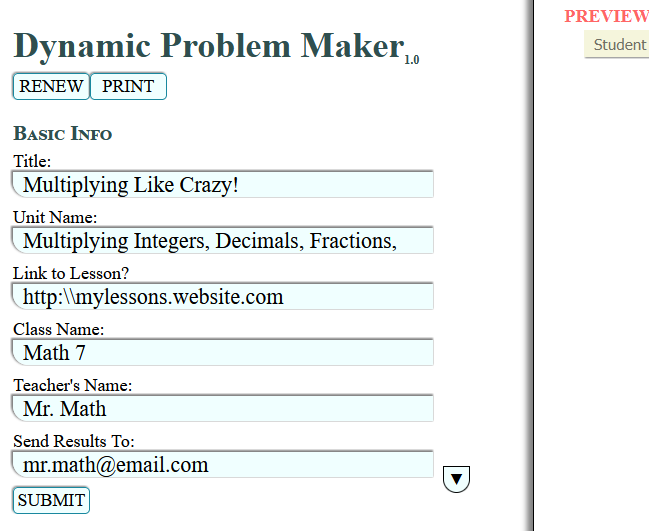
Basic information.

Fill in everything you'd normally put on an assignment. You can also drop in a link to a lesson or video that students can reach if they need help.

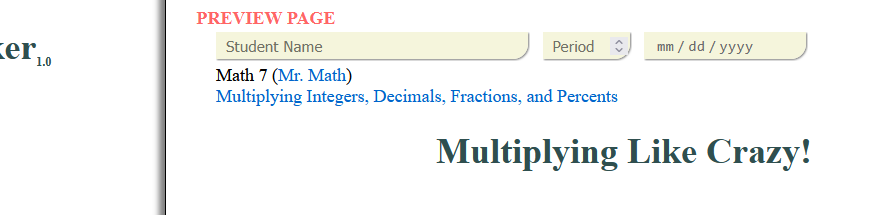
After you submit, the info populates the Preview Page. Click EDIT any time to change it.

Dynamic Problem Maker — entering the assignment's basic information
The populated Preview Page after submitting basic info
Part 02

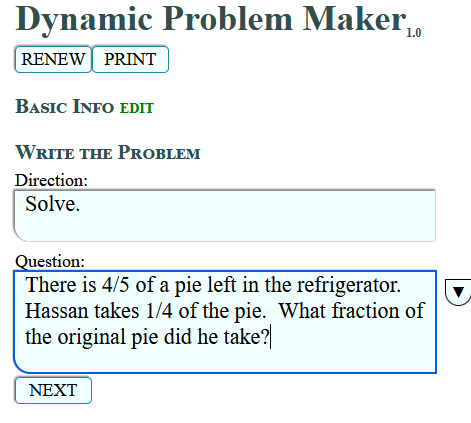
Create the problem.

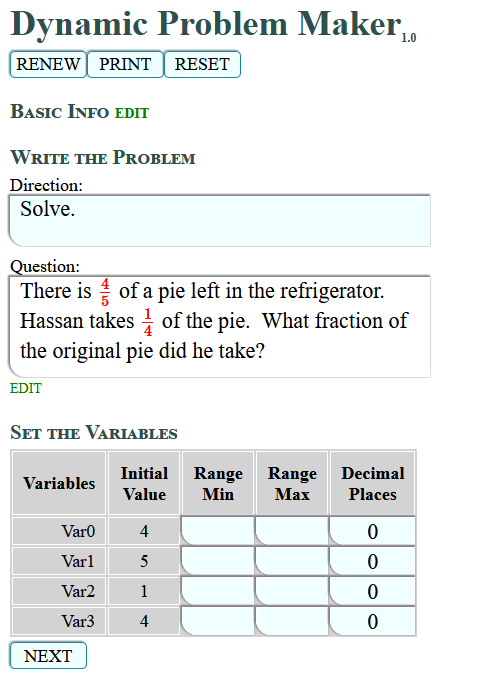
Write the directions and an engaging word problem. The program finds every number in the problem and turns it into a variable — a little Algebra knowledge goes a long way. Use the pop-up tool for squares/cubes on units (cm², m³), pi (π), and degrees (°).

The program doesn't recognize radicals (square roots). For exponents not on units, use the caret: 5^2 becomes 52.

Dynamic Problem Maker — writing the directions and word problem
Numbers in the problem automatically converted to variables
Part 03

Set the variables.

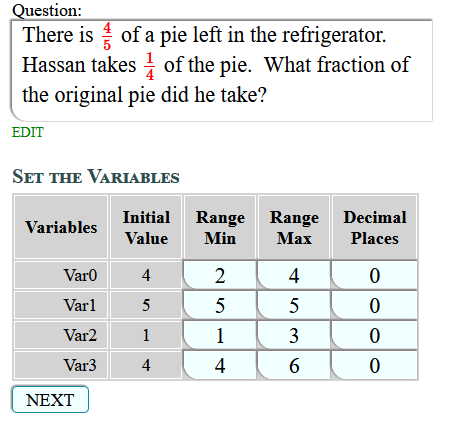
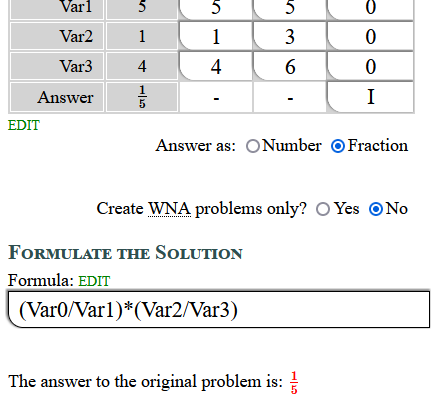
Give each number a realistic range so it can generate dynamically. Want a number to stay fixed? Use the same value for "min" and "max". You can also set how many decimal places each number generates — the program pre-fills its best guess from your typed problem.

In the example, the first fraction's numerator ranges 2–4 while its denominator stays fixed at 5; the second fraction is fully dynamic on top and bottom.

Dynamic Problem Maker — setting min/max ranges and decimal places for each variable
Part 04

Formulate the solution.

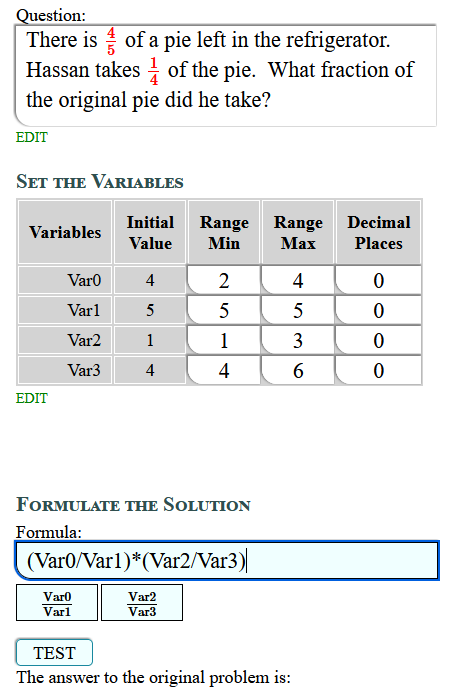
Basic Algebra again: if the first number times the second number solves it, the formula is Var0*Var1 — and that solves every generated version. Variable buttons are provided to make fractions and exponents easier.

Test the formula and pick fraction or decimal output (click the fraction button repeatedly for improper vs. mixed). Set rounding — including "always round up" (How many pencils does Jerome need to buy?) or "always round down" (How many can Katie afford?). With fractions, you can even force whole-number answers only.

Always confirm the answer shown in red is correct — that means your formula is right. If not, edit and re-test.
Dynamic Problem Maker — entering and configuring the solution formula
Testing the formula and verifying the computed answer
Part 05

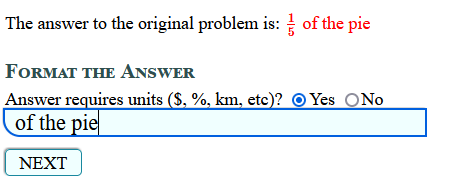
Format the answer.

Most word problems need units. Students must type units with their answer to get full credit — and the program can tell the difference between a numerically-correct answer that's just missing units and one with the wrong unit entirely.

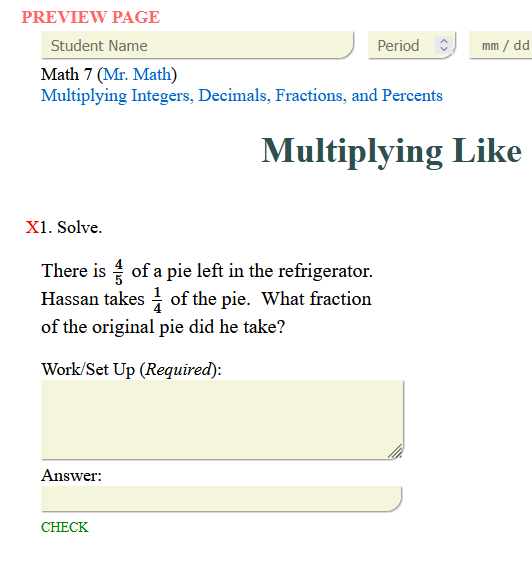
Click next and, if everything's valid, the green "add" button appears. Adding sends the problem to the Preview Page and resets the left side for the next one. When you're done, PRINT and then DOWNLOAD the worksheet as a standalone HTML file.

Dynamic Problem Maker — formatting the answer and required units
The completed problem added to the preview page
Example

See a finished worksheet.

A completed dynamic problem set. Refresh the page and watch the numbers change — it's very unlikely two students ever get the same worksheet.

Ready when you are

Build your first problem set.

No signup, no install — it runs in your browser and downloads as a standalone file you can hand to students or post anywhere.